Dev Wallet
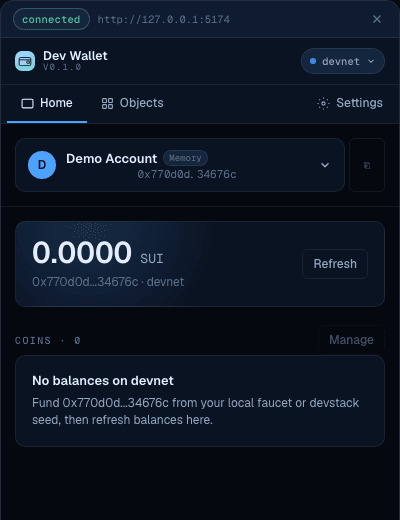
A development-only wallet for building and testing Sui dApps, no extension required
A development-only wallet for building and testing Sui dApps — no browser extension required.
This wallet is for development and testing only. Do not use it to store real funds.
Pre-1.0: This package is under active development. Minor versions may contain breaking changes until the API stabilizes at 1.0.
Quick start
The recommended path: if your app uses @mysten/dapp-kit-react, embed the wallet directly with the
dApp Kit plugin. It inherits your network config, appears in the wallet picker, and needs no
extension.
pnpm add @mysten-incubation/dev-walletimport { createDAppKit } from '@mysten/dapp-kit-react';
import { devWalletInitializer } from '@mysten-incubation/dev-wallet';
import { WebCryptoSignerAdapter } from '@mysten-incubation/dev-wallet/adapters';
const dAppKit = createDAppKit({
networks: ['devnet'],
walletInitializers: [
devWalletInitializer({
adapters: [new WebCryptoSignerAdapter()],
autoConnect: true,
mountUI: true,
}),
],
});That's it — the dev wallet now shows up in dApp Kit's wallet picker. See Getting started for the full setup, peer dependencies, and a non-dApp-Kit path.
How it works
The dev wallet implements the wallet-standard interface (sui:signTransaction,
sui:signAndExecuteTransaction, sui:signPersonalMessage) and registers itself in the
wallet-standard registry. It appears in dApp Kit's wallet picker alongside production wallets.
Key management is handled by pluggable adapters — InMemory (ephemeral), WebCrypto (persistent), Passkey (biometric), and Remote CLI (sui keystore). See Adapters for details.
Other ways to use it
Beyond the embedded happy path, the dev wallet covers a few more workflows:
| I want to... | How | Details |
|---|---|---|
| Connect a wallet to localnet or a custom network | Built-in — devnet, testnet, localnet included by default. Pass custom URLs via networks config. | Getting started |
| Test my dApp end-to-end without click-through approvals | Set autoApprove: true | e2e testing |
| Keep a persistent dev wallet that survives page reloads | Use WebCryptoSignerAdapter — keys stored in IndexedDB, survive refresh and restart | WebCrypto adapter |
| Sign with the same address I published contracts from | Use the standalone wallet + RemoteCliAdapter | CLI signing |
| Try a dApp without installing anything | Use the hosted wallet at sui-dev-wallet.vercel.app | Hosted wallet |
| Share one wallet across multiple dApps | Run the standalone wallet, register it in each dApp | Standalone mode |
| Build a demo app users can try without installing a wallet | Set autoConnect: true, mountUI: true — wallet embeds directly, no extension needed | Getting started |
| Keep dev keys separate from mainnet credentials | All adapters are isolated from production wallets by design — keys are ephemeral or browser-scoped | Adapters |
Standalone wallet
Run the wallet as its own web app — your dApp connects via popup, just like a production wallet.
Start the server, then register it through walletInitializers:
pnpm dlx @mysten-incubation/dev-wallet serveimport { createDAppKit } from '@mysten/dapp-kit-react';
import { devWalletClientInitializer } from '@mysten-incubation/dev-wallet/client';
const dAppKit = createDAppKit({
networks: ['devnet'],
walletInitializers: [devWalletClientInitializer({ origin: 'http://localhost:5174' })],
});The default port is 5174. If the port is busy, the server picks the next available one — check the terminal output. See Standalone mode for details.
Guides
- Getting started — installation and first setup
- Hosted wallet — the standalone wallet, already deployed
- e2e testing — automated testing with auto-approval
- CLI signing — sign with your contract publish address
- Standalone mode — one wallet across multiple dApps
- Reference — adapters, APIs, and architecture